Citation capture.
Rethought.
The fastest way to save research quotes with correct citations.
Highlight text while reading. Piles stores the snippet together with its citation - source, metadata, and DOI included.
We’ll send you a one-time link. No passwords - just open and start clipping.
How it works
While reading a paper, you spot a passage that piques your interest. Highlight it, then either click “Add to Piles” from the browser context menu or press your custom keyboard shortcut. The snippet is stored immediately - there’s no pop‑up, no confirmation, no additional clicks.
No folders. No tagging. No decisions while you’re thinking.
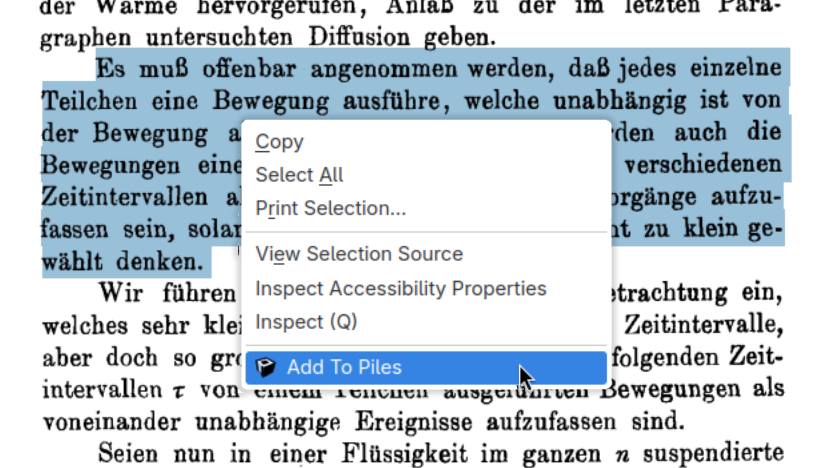
A highlighted passage captured directly during reading via “Add to Piles”. Citation metadata is generated automatically.
Once your reading session is finished, open your Pile and let the tool automatically compile a BibTeX (or similar) file that includes every source you highlighted during the session - ready for import into your reference manager or LaTeX workflow.
@article{einstein1905,
  author  = {Einstein, Albert},
  title   = {Zur Elektrodynamik bewegter Körper},
  journal = {Annalen der Physik},
  year    = {1905},
  doi     = {10.1002/andp.19053221004}
}
The BibTeX file that can be imported into Zotero, Overleaf, or any other reference manager.
Make every highlight citable.
Stop carrying uncited passages forward into your writing phase. Capture once. Export cleanly. Write with confidence.
Integrations
Piles is a lightweight “clip‑and‑export” helper that plugs into the reference managers you already use. Highlight a passage, press Ctrl‑Alt‑C, and let Piles do the rest: Capture → Store → Export.
Works with your favorite tools




Export simply writes a clean, version‑controlled BibTeX file that can be imported into any of the above.
Q&A
-
What is a Pile?
A pile is a temporary working collection. While you read, you simply add passages to the pile without organizing them. Structure is applied later, when you export citations into your writing workflow. -
What does “NO AI” mean for my data?
Your data is never sent to or processed via external services. -
Can I export my snippets to other tools?
Exports are currently provided as JSON and BibTeX; additional targets will be considered in the future. -
How can I verify the metadata is accurate?
Piles retrieves DOIs and bibliographic information from trusted APIs. If you spot a discrepancy, you can report the incorrectly interpreted entry through the web interface. -
What happens to my data if I uninstall Piles?
All data associated with your account is removed from the server when you delete the account. -
Will you support mobile apps?
I may look into developing mobile apps that share the same feature set; exports will remain JSON and BibTeX, with the possibility of adding more targets later. -
Where is my data stored?
All user data is stored on a server hosted inside the European Union, ensuring compliance with EU data‑protection regulations. -
Who is Piles not for?
Piles is not designed for casual bookmarking or long-term knowledge gardening. It’s built for focused reading sessions where accurate citation matters.